
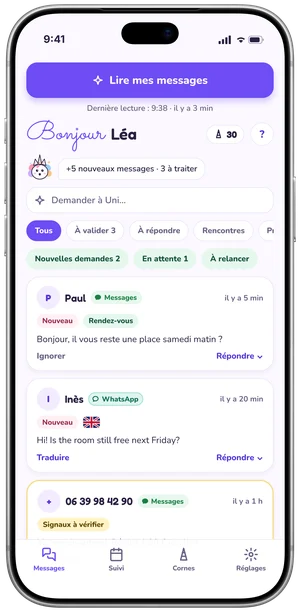
All your messages in one place, at last
- Your texts and your WhatsApp chats in the same feed (WhatsApp with Premium and Pro).
- Those waiting for a reply and those to check, kept apart.
- Time elapsed on each conversation, so nobody is left waiting.
Unibow reads your messages, sorts them and prepares a reply. You read it over and send it yourself from Messages or WhatsApp.
 Coming soon
 Sample data
Six screens of the app, with sample messages (app shown in French).
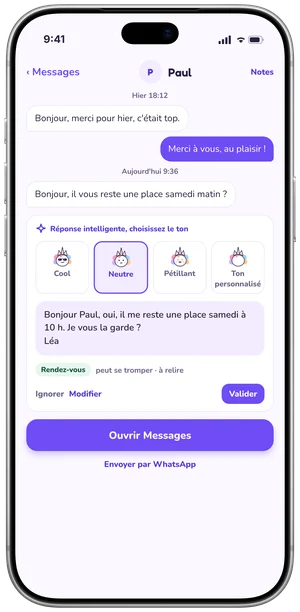
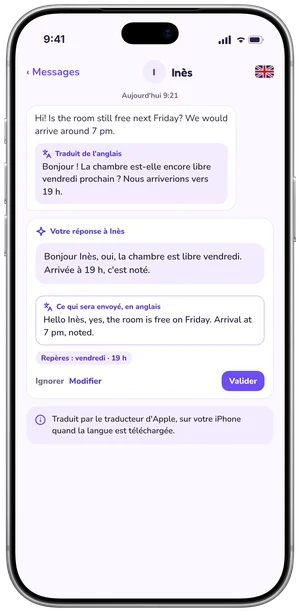
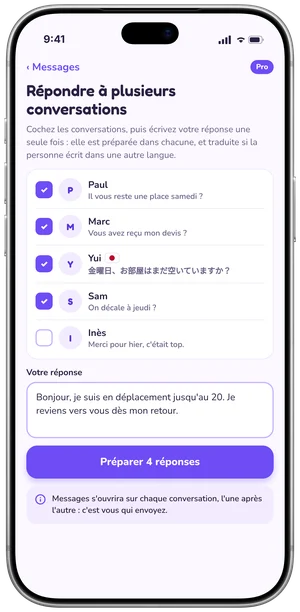
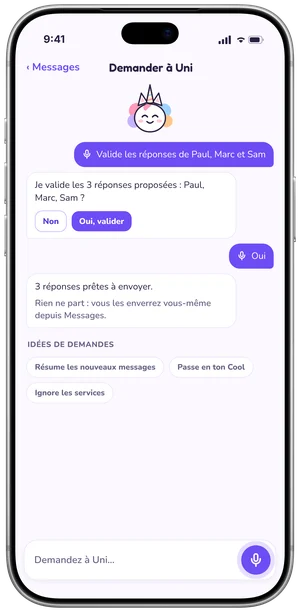
Unibow reads your messages, sets aside what needs nothing and writes a reply for each of the others in seconds, then translates when needed. You touch them up by voice, approve and send.
Changing the tone by voice: Premium. Approving several conversations at once: Pro. On the free plan, one at a time, with "Next" after each send.
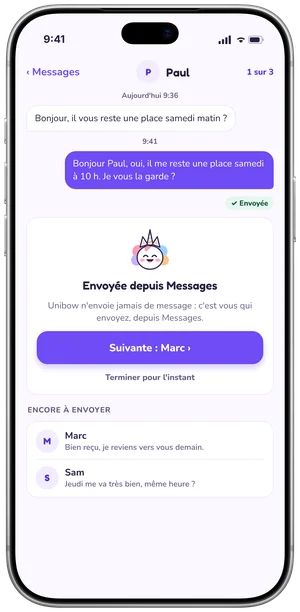
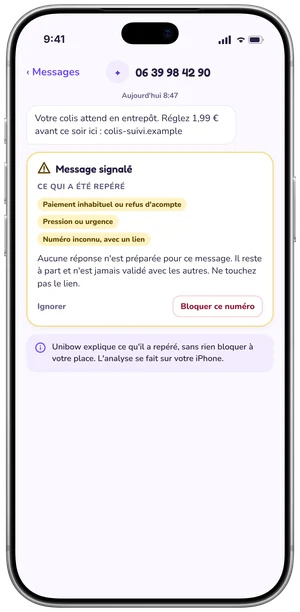
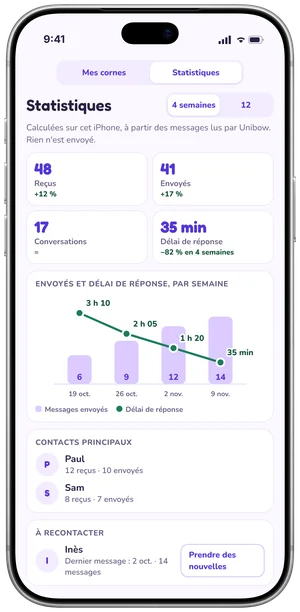
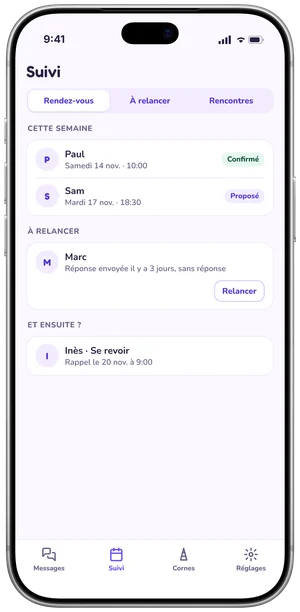
Your appointments in the Follow-up tab. In Pro: stages on the home screen and dated reminders.
What matters about each person, kept on your iPhone.
A name, a number, a word from a message or a note: found across all your conversations (Premium).
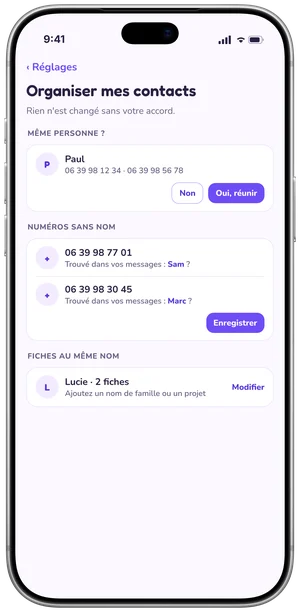
Conversations kept by number, suggested names, "Same person?".
Your messages arrive as soon as you open the app, or pull down.
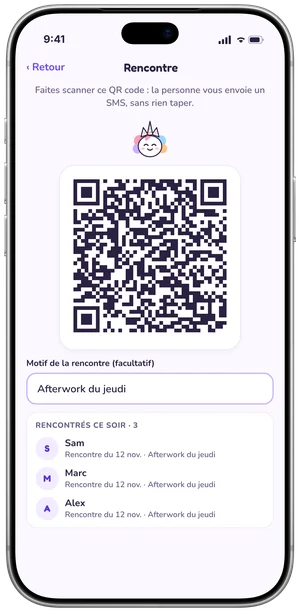
A thank-you message ready for each person you met.
The people you named in Unibow, added in one go.
Dress Uni up with the horns you earn by spreading the word.
Everyday work is free and unlimited. Premium adds memory and comfort, Pro adds volume.
Read and sort your requests, reply, translate, caution, your notes and appointment follow-up, without limits.
€0
Your whole history, and replies your way.
€4.99 per month
or €49.99 per year
One-month free trial, once.
For people who deal with clients.
€19.99 per month
or €199.99 per year
One-month free trial, once.
Coming soonGmail, Outlook and other mail servicesYour emails sorted and your replies prepared, just like your messages. In 2027, first with Pro.
On an iPhone older than iPhone 15 Pro, tones and "My style" don't work: Premium is still worth it for history, search and dictation.
The subscription renews automatically unless cancelled at least 24 hours before the end of the current period. Manage or cancel it in your Apple account settings.
Unibow doesn't replace Messages or WhatsApp: it works alongside them. It reads, sorts and prepares your replies; you always send from your usual apps. Keep WhatsApp Business to present your business, and Unibow so no customer is left without a reply.
| Criterion | Unibow | WhatsApp Business |
|---|---|---|
| Read and sort | ||
| Your texts and your WhatsApp | yes: Both in the same feed (WhatsApp with Premium and Pro) | WhatsApp only, not texts |
| Spots what needs a reply | yes: Automatic: to answer, to check, nothing to answer | Labels you set yourself |
| Flags messages to check | yes: Payment, code, personal details: explained | not found |
| Reply | ||
| A reply prepared for each message | yes: Ready-made, or smart (iPhone 15 Pro and later) | Draft reply (Meta AI, rolling out) |
| Replies sent automatically | no: No, by design: nothing is sent without you | yes: Greeting, away message, Meta AI agent |
| Standard messages | yes: 1 free, up to 5 in Pro | yes: Quick replies |
| Choice of tone | yes: Cool, Neutral, Upbeat | Professional, funny, supportive (Meta AI) |
| Learns how you write | yes: "My style" (Premium) | not found |
| Translation | yes: Received message and reply (Apple's translator) | yes: Long-press › Translate, on device |
| One reply for several people | yes: Pro: sent one by one, by you | yes: 1:1 broadcasts (some countries) |
| Follow up with customers | ||
| Appointments and follow-ups | yes: Follow-up tab; home-screen stages in Pro | Labels you set yourself |
| Notes about a person | yes: Typed or dictated | not found |
| Dated reminders | yes: Pro | not found |
| Statistics | yes: Messages per week, reply time (Pro) | Broadcast insights |
| QR code to message you | yes: "Meeting": prepares a message to you | yes: QR code and short link |
| Present your business | ||
| Profile, catalogue, orders | no: No | yes: Business profile, catalogue, cart |
| Phones | iPhone (iOS 26 and later) | iPhone and Android |
| Privacy | ||
| Where your messages are processed | yes: On your iPhone: no server, no online AI | End-to-end encrypted; optional AI features processed by Meta |
| Ads | yes: None | Not in chats; in the Updates tab |
| Price | ||
| Price | Free; optional Premium and Pro | Free |
✓ yes · ✗ no · — no equivalent feature found in the official documentation at this date. Updated on 10 November 2026.
Comparison based on the features published by WhatsApp (Meta) for the WhatsApp Business app as of 10 November 2026. Some features depend on country and language. Spotted a mistake? Write to us at unibow@lugia.fr.
Unibow reads your messages on your iPhone. None of your messages are sent to Unibow.
For now, Unibow is for iPhone only: an iPhone with iOS 26 or later (iPhone 11 and later, iPhone SE 2nd generation and later). Smart replies need iPhone 15 Pro or later; on older iPhones, sorting, caution, translation and ready-made replies work.
Not in this version. Unibow prepares the reply and opens Messages (or WhatsApp) on the right conversation: all that's left is to send it.
No. Your messages stay encrypted on your iPhone. Smart replies are written by your iPhone. Only translation may go through Apple when the language isn't downloaded.
Yes, with Premium and Pro: your WhatsApp chats come into Unibow alongside your other messages, sorted the same way, with a reply prepared. It opens in WhatsApp on the right chat: you send it. This is a first version: groups, photos and voice messages are not read.
Not yet. Gmail, Outlook and other mail services are coming in 2027, first with Pro.
Unibow is free with no ads. Premium and Pro add features, with a one-month free trial, once.
In Settings › Privacy, "Delete my access" erases everything, on your iPhone and on the server.
Message Unibow by text or WhatsApp from the app (Settings › Help and feedback), or email unibow@lugia.fr.
 Coming soon